


6 Maneras de Personalizar el Sidebar
¡Que tal mundo!!Feliz Dominguito y hoy les trago este maravilloso tutorial donde encontraran 6 formas distintas de personalizar tu sidebar de Blogger con CSS. En mi ultimo tutorial te enseñe como añadir un menú flotante con iconos de redes sociales y hoy le toca al sidebar. Verán que este tutorial es super sencillo y para nada complicado. Estos diseños los vi en el blog De Morros con el 2.0, PD: a los códigos, yo solo le agregue algunas cositas para que sea un poco, mas entendible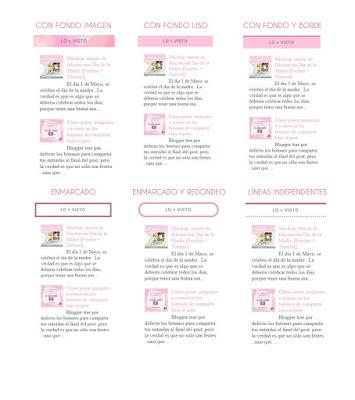 1. TÍTULO CON FONDO DE IMAGEN
div.widget > h2,
div.widget h2.title {
margin: 0 0 1em 0;
text-align: center; /*ubicación del texto*/
text-transform: uppercase; /*para mayúsculas*/
letter-spacing: 1px;
background: url("URL DE TU IMAGEN") repeat-x;
padding: 10px;
font: $(widget.title.font);
color: $(widget.title.text.color);
}
2. TÍTULO CON FONDO LISO
div.widget > h2,
div.widget h2.title {
  margin: 0 0 1em 0;
text-align: center; /*Ubicación del texto*/
text-transform: uppercase; /*Para mayúsculas*/
letter-spacing: 1px;
background: #F3C2D8;/*Color del fondo*/
padding: 10px;
  font: $(widget.title.font);
  color: $(widget.title.text.color);
}
3. TITULO CON FONDO Y LÍNEA
div.widget > h2,
div.widget h2.title {
  margin: 0 0 1em 0;
text-align: center;/*Ubicación del texto*/
text-transform: uppercase;/*Para mayúsculas*/
letter-spacing: 1px;
background: #F3C2D8;/*Color del fondo*/
border-top: 2px solid #C38AA3;/*Color de linea y grosor*/
padding: 10px;
  font: $(widget.title.font);
  color: $(widget.title.text.color);
}
4. TITULO ENMARCADO
div.widget > h2,
div.widget h2.title {
  margin: 0 0 1em 0;
text-align: center;/*Ubicación del texto*/
text-transform: uppercase;/*Para mayúsculas*/
letter-spacing: 1px;
border: 5px ridge #C38AA3;/*Color de linea y enmarcado*/
padding: 10px;
  font: $(widget.title.font);
  color: $(widget.title.text.color);
}
5. TITULO ENMARCADO CON REDONDEO
div.widget > h2,
div.widget h2.title {
  margin: 0 0 1em 0;
text-align: center;/*Ubicación del texto*/
text-transform: uppercase; /*Para mayúsculas*/
letter-spacing: 1px;
border: 5px double #C38AA3;/*Color de linea y enmarcado*/
border-radius: 25px; /*este valor es para redondear el marco*/
padding: 10px;
  font: $(widget.title.font);
  color: $(widget.title.text.color);
}
6. TITULO CON LÍNEAS INDEPENDIENTES
div.widget > h2,
div.widget h2.title {
  margin: 0 0 1em 0;
text-align: center;/*Ubicación del texto*/
text-transform: uppercase;/*Para mayúsculas*/
letter-spacing: 1px;
border-top: 5px ridge #C38AA3;/*Color de linea arriba*/
border-bottom: 3px dotted #C38AA3;/*Color de segunda linea y grosor*/
padding: 10px;
  font: $(widget.title.font);
  color: $(widget.title.text.color);
}







 Puzzle Bobble
 Karate Blazers
 Puzzle De Bloques
 Magical Cat Adventure